
Agency Timesheet Template for Google Sheets and Excel
Here's a ready-to-use agency timesheet template for Google Sheets and Excel, designed to help agencies track billable hours, streamline invoicing, and maintain project margins.


Agencies lose money in small, quiet ways, and the easiest one to miss is time. Industry analyses consistently show that 10–20% of billable time is never invoiced, especially when tracking is manual. That’s why an agency timesheet template matters. Not as admin, but as an operational control point.
A clear, structured timesheet makes work visible across clients, projects, and roles. It shows what’s billable, what isn’t, and where time is actually going—before invoices go out and before profitability gets distorted. When done right, it supports accurate billing, cleaner payroll, and better planning without adding friction for the team.
This guide provides a practical agency timesheet template for Google Sheets and Excel, built for real agency workflows. You’ll see how to track time consistently, choose the right format, and use timesheets as an operational tool, not just a record of hours worked.
What is an agency timesheet template?
An agency timesheet template is a simple, structured way to record how time is spent across clients, projects, tasks, and roles, most often in a spreadsheet. Instead of everyone tracking time in their own format, the template standardizes key details like date, client, project, task description, billable status, rate, and total hours. That consistency is what turns time entries into usable data for billing, payroll, utilization, and profitability, without the weekly cleanup.
Why agencies need a dedicated timesheet structure
Agency workflows are inherently fragmented. On any given day, team members can touch multiple clients, switch between delivery and internal coordination, and jump across projects with different billing rules. Without a clear timesheet structure, that reality turns into guesswork.
When time tracking is loose or inconsistent, the same problems show up quickly:
- Billable work gets missed because hours are logged late or not at all.
- Invoices become harder to defend, leading to write-offs and client pushback.
- Payroll takes longer, as hours need to be pieced together manually.
- Project planning drifts because estimates are based on memory instead of data.
A dedicated timesheet structure addresses this issue at its source. It provides everyone with a uniform way to log time, consistent definitions of billable work, and a clear review point before billing and payroll occur. With that consistency in place, time tracking stops being reactive and starts supporting accurate billing, reliable payroll, realistic estimates, and better resourcing decisions.
Considering software instead of spreadsheets? The guide below compares the most commonly used timesheet apps for agencies, including automation, reporting, and billing features.


Benefits of using timesheet templates for agencies
Below are the core benefits of using timesheet templates in an agency environment, broken down into clear, practical outcomes.
Better visibility into team performance
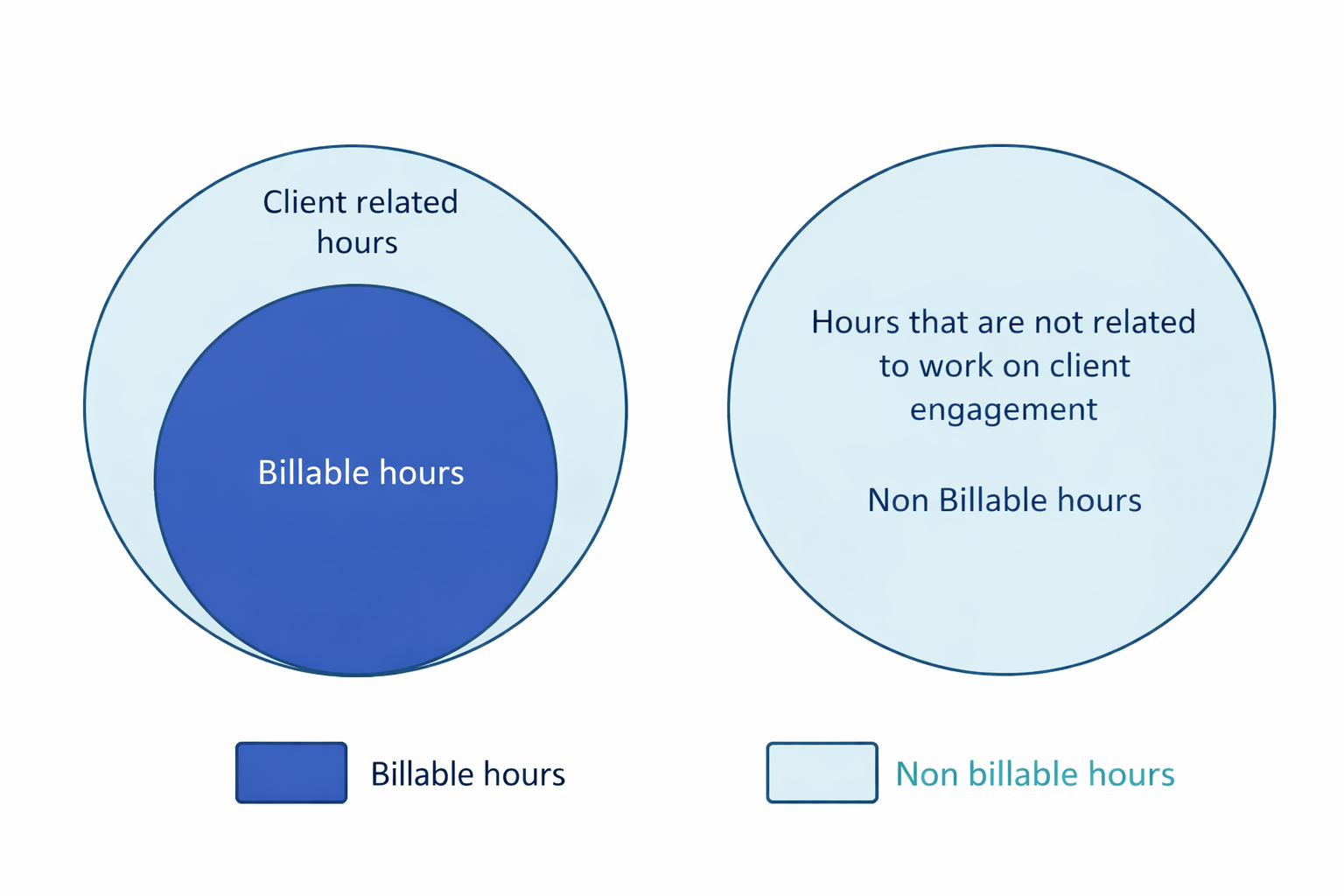
When time is logged consistently, agencies gain a clear view of how work is distributed across clients, projects, and roles—and whether that distribution matches the plan.
What visibility enables agencies to do
Key outcomes
- Fewer assumptions about where time goes
- Faster identification of operational inefficiencies
- Better margin protection without micromanagement
Faster Client Billing and Invoicing
Billing slows down when time entries are incomplete, inconsistent, or logged retroactively. A structured agency timesheet template tightens the entire billing flow—from time entry to invoice approval.
The four habits behind faster billing
Billing disputes usually start with ambiguity. When clients question line items, teams often reconstruct work from Slack messages and calendars. Structured time logs replace guesswork with a clean audit trail.
Simplified Payroll Management
Agencies rarely operate with a single employment model. Full-time staff, part-time contributors, and freelancers often work across different clients, roles, and rates.
Timesheet templates create a single source of truth for payroll.
How templates improve payroll accuracy
Improved Project Planning and Resource Allocation
Effective planning depends on historical data, especially in agencies balancing recurring retainers with unpredictable project work. Timesheet templates capture that history in a way teams can actually use.
With consistent time data, agencies can:
- Create more accurate project estimates. Timesheets show how long tasks and deliverables actually take across roles. When data shows that a “landing page redesign” typically requires 28–35 hours across design, copy, and QA, estimates can be grounded in reality instead of best guesses.
- Staff projects based on real effort, not optimism. Historical time data reveals the true workload behind each role. This makes it easier to assign the right mix of people from the start, rather than stretching teams and hoping they absorb the extra work.
- Plan capacity before delivery suffers. Comparing upcoming work against historical throughput highlights overload risk early. If a strategist is already 85% allocated to billable work, adding even a small new project is likely to affect quality or timelines.
- Catch scope creep while it’s still manageable. When client work and internal work are tracked separately, rising non-billable time becomes visible. That signal supports timely, fact-based scope conversations before projects drift and margins erode.
Without doubt, timesheets are one of the simplest ways to protect agency margin without changing your entire delivery process. They are effective whether you rely on a structured template or move toward the best recruitment agency timesheet software as complexity grows.
👉 Now, let’s explore free agency timesheet templates you can use in practice.
Free agency timesheet templates
Here are three ready-to-use formats. Choose the one that matches how your team actually works.
Google Sheets agency timesheet template (best for teams)
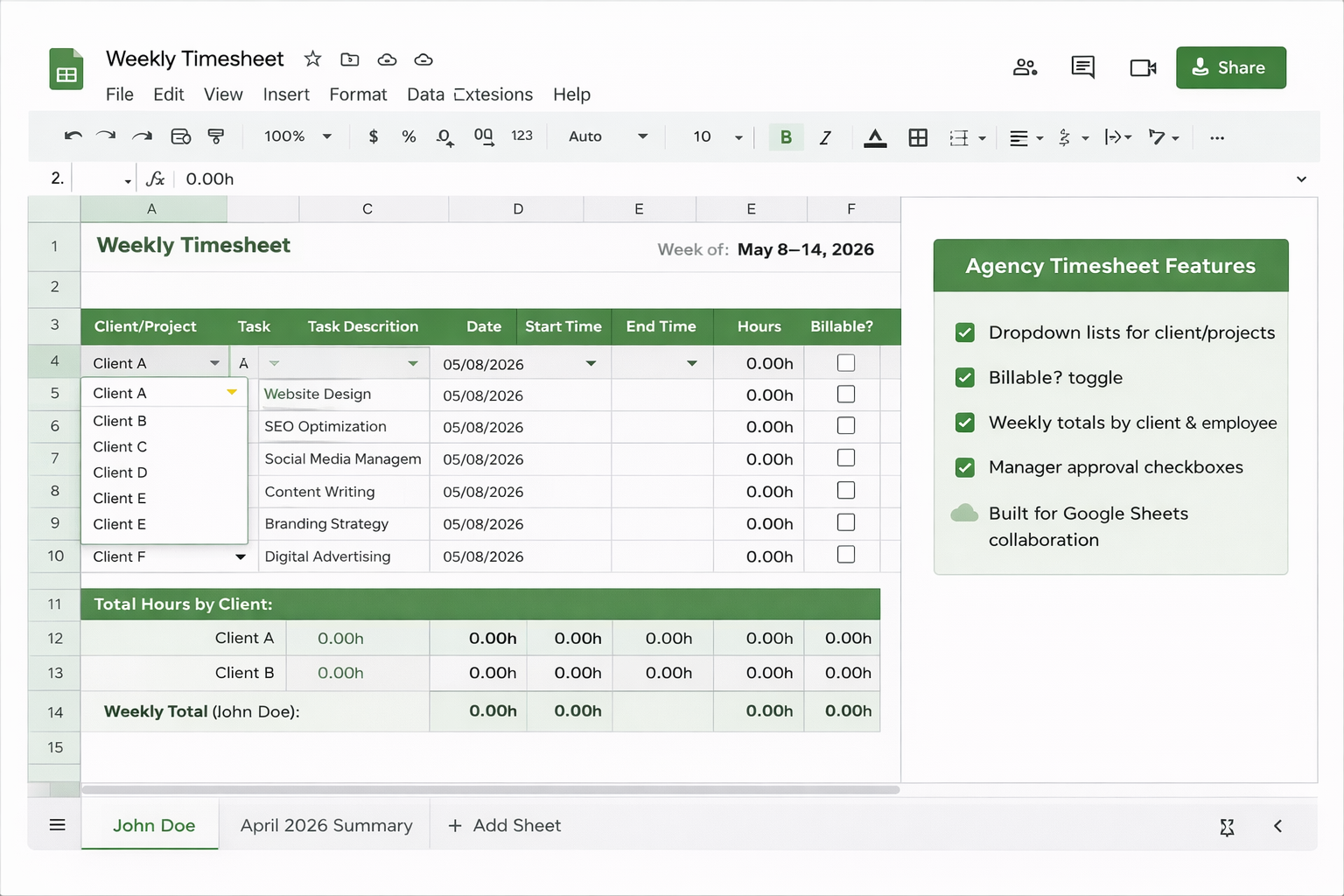
Google Sheets is the default for most agencies because it supports real-time collaboration and reduces version-control chaos. One shared timesheet can work well for small teams, while larger teams can use one sheet per person (or per client) and roll up totals into a weekly summary tab.
A practical Google Sheets setup includes:
- Dropdown lists for clients/projects (to prevent spelling variations)
- A “Billable?” toggle
- Weekly totals by client and by employee
- A manager approval column (simple checkbox)
Because the file is cloud-based, it’s easier to enforce a consistent workflow: daily entries, weekly review, and invoice generation. If you’re doing any kind of distributed or hybrid work, Sheets usually beats Excel on collaboration alone.
Excel agency timesheet template (best for offline control)
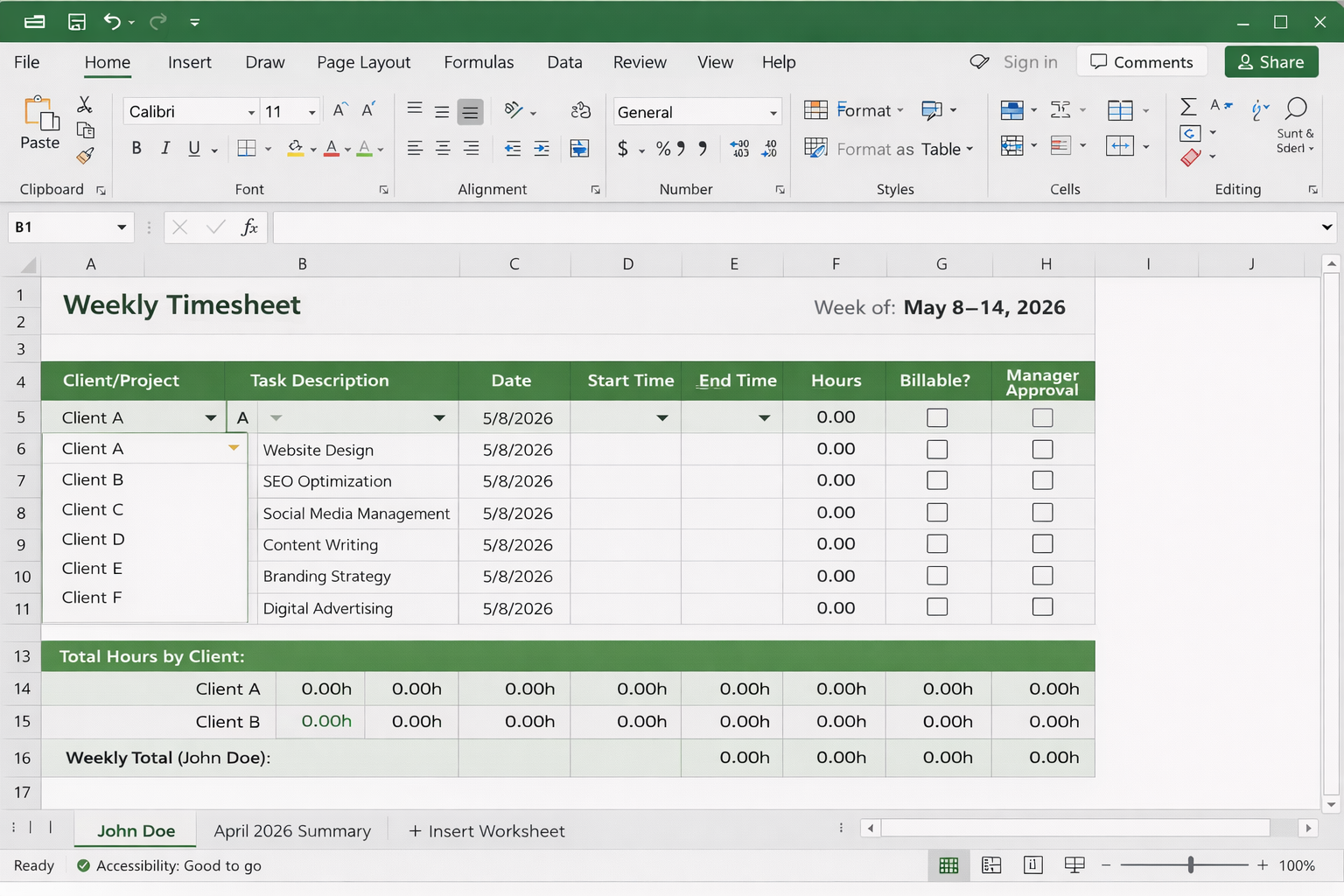
Excel works well when you want tighter offline control, more advanced formulas, or when certain stakeholders still prefer desktop workflows. Many finance teams are simply faster in Excel, especially for multi-step billing calculations.
The trade-off is version control. If multiple people edit separate copies, you can end up reconciling duplicates and outdated versions at billing time. If you decide to use Excel, keep the rules strict:
- One owner (finance/ops) controls the master file.
- Contributors submit weekly entries by a fixed cutoff time.
- The master file is the only source used for invoicing and payroll.
PDF agency timesheet (best for signatures and client-facing logs)
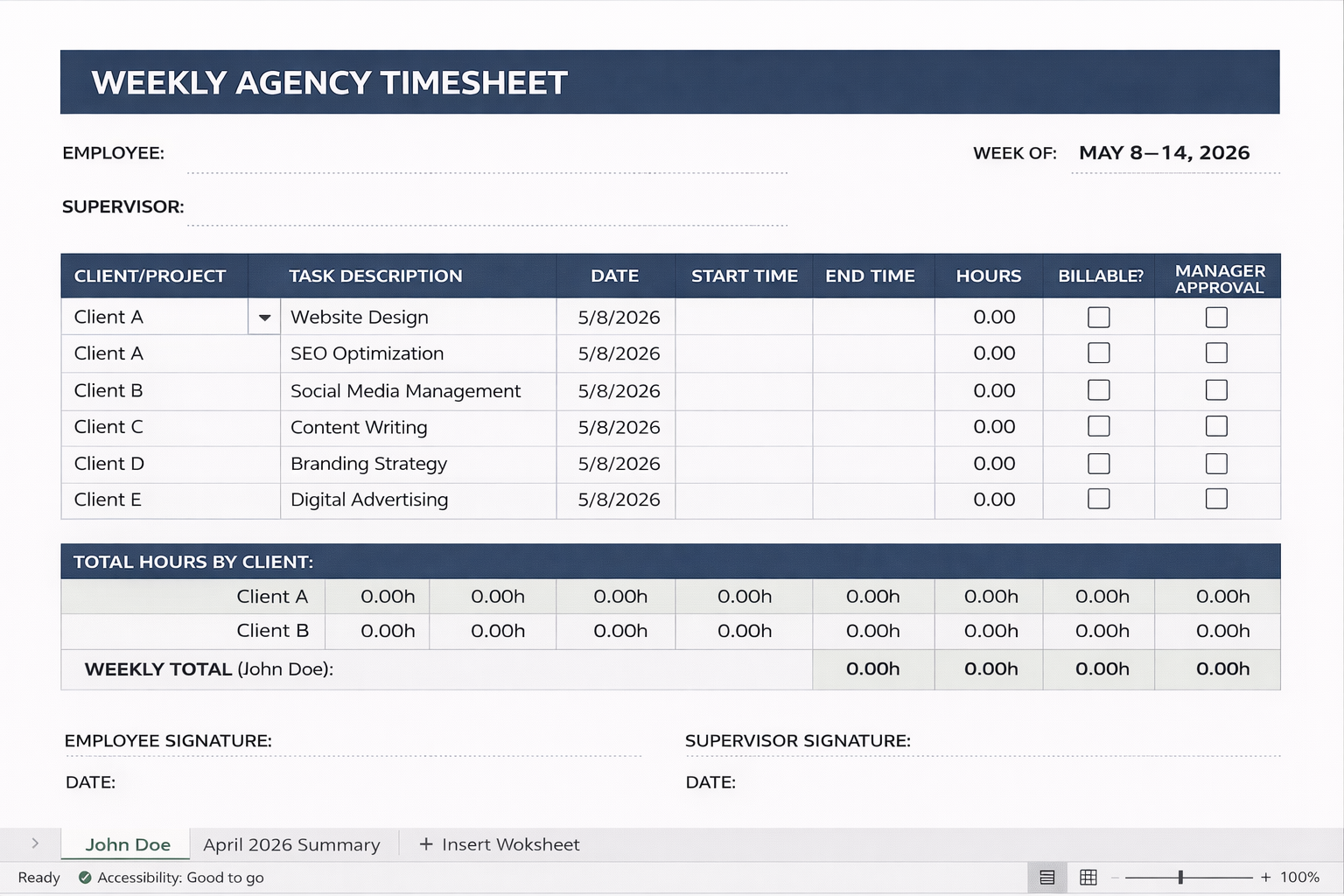
PDF timesheets are best used when you need a fixed, non-editable record, such as for approvals, signatures, or client-facing documentation. They’re especially useful in situations where formal sign-off or compliance requirements apply.
The limitation is that PDFs aren’t designed for analysis. Totals can’t be easily rolled up across clients, profitability can’t be reviewed, and data usually has to be re-entered before it can be reused. For that reason, PDFs work best as an output format rather than a primary tracking system.
A practical workflow is to track time in Google Sheets or Excel, export a weekly or monthly summary to PDF, and then send it for approval or archive it alongside invoices. This approach preserves the flexibility of spreadsheets while still providing a clean, fixed record when documentation is required.
Google Sheets & Excel templates vs. time-tracking software tools
Spreadsheets work well when an agency is small, workflows are predictable, and reporting requirements are limited. They’re easy to adopt and flexible enough for basic tracking. However, as teams grow and expectations around accuracy, compliance, and reporting increase, manual processes start to show their limits.
This is where dedicated agency timesheet software becomes relevant. These tools reduce manual steps, enforce consistency, and support automated reporting and billing workflows. TMetric, for example, positions itself around agency needs like time tracking, reporting, team timesheets, and billing/invoicing support.
Here’s a practical comparison:
If spreadsheets are no longer keeping up with your needs, it can help to compare dedicated tools. This best timesheet software roundup highlights TMetric alongside other leading time-tracking and billing apps, with key features, pros, and pricing to help agencies choose the right solution.
The Takeaway
A structured agency timesheet system is one of the fastest ways to tighten billing, clean up payroll, and plan projects with confidence without changing how your team actually works. Templates succeed for one reason: consistency. The same fields, the same rules, the same weekly rhythm. That’s what turns scattered hours into usable data.
For small or lean agencies, a spreadsheet-based timesheet is usually enough. Google Sheets works best for collaboration, Excel gives you stronger offline control, and PDFs are ideal when you need fixed, signed records.
As agencies grow, manual tracking starts to crack with missed billable hours, slower invoices, and weak visibility into utilization. That’s where time-tracking software earns its place, reducing admin, improving accuracy, and supporting billing at scale. If you’re exploring that path, TMetric’s agency-focused overview is a solid place to start.
FAQ
What is the best timesheet format for agencies?
For most agencies, the best format is the one that gets filled out daily and reviewed weekly. In practice, Google Sheets is best for collaboration and fewer version conflicts, Excel is best for offline finance workflows, and software is best when you need automation (timers, reminders, invoice-ready reporting).
How do agencies track billable hours?
The reliable method is to track time against a client + project + task category, and mark entries as billable or non-billable at the moment of logging. Agencies that wait until the end of the week typically lose detail and miss billable work, which is a common driver of revenue leakage in manual tracking.
Can I use Google Sheets for team timesheets?
Yes. Google Sheets works well for small-to-mid teams because it supports real-time editing, shared dropdown lists (clients/projects), and easy rollups by client or employee. The key is to enforce consistent naming conventions and a weekly approval step.
What should an agency timesheet include?
At minimum: date, team member, client, project, task description, hours, billable/non-billable flag, and (optionally) hourly rate and approval status. Those fields are enough to support billing, payroll, utilization checks, and basic profitability analysis.
Do I need time-tracking software, or is a template enough?
A template is enough when your team is small and disciplined, and when reporting requirements are light. Software becomes worth it when you need automation (timers, reminders), stronger accuracy, and faster billing workflows, especially as manual approaches can introduce significant errors and missed hours at scale.